n8n vs Zapier vs Make: Which Automation Tool to Choose in 2026?
n8n, Zapier and Make all connect apps and automate tasks, but they differ on hosting, how they bill and how technical they are. Here is a fair comparison to pick the right one.
n8n, Zapier or Make: which one should you choose?
Zapier is the easiest to start with and has the largest catalogue of integrations. Make offers a powerful visual editor for complex scenarios at a generally moderate cost. n8n is the most flexible for technical teams: it can be self-hosted, accepts JavaScript or Python code, and has strong AI and agent features. The right choice depends less on features than on three questions: who will build the automations, where the data must stay, and how many runs you expect each month.
What are n8n, Zapier and Make?
- Zapier — a cloud automation platform. You build "Zaps": a trigger (new email, new form entry) followed by actions in other apps.
- Make (formerly Integromat) — a cloud platform where you design "scenarios" on a visual canvas, with routers, iterators and aggregators to handle branching and lists.
- n8n — a workflow automation tool available as a cloud service or self-hosted. Its source code is available under a fair-code licence, and its Community Edition can run on your own server.
How do they compare?
| Criterion | Zapier | Make | n8n |
|---|---|---|---|
| Hosting | Cloud only (SaaS) | Cloud only (SaaS) | Cloud or self-hosted |
| Pricing model | Per task (each successful action step) | Per credit (most module runs cost 1 credit) | Cloud: per workflow execution, whatever the number of steps |
| Free option | Free plan with a limited monthly task allowance | Free plan with a limited monthly credit allowance | Cloud free trial; Community Edition free to self-host |
| Self-hosting | No | No | Yes (Docker, VPS, Kubernetes) |
| AI features | Copilot to build Zaps, AI steps, Agents and Chatbots products, MCP | AI assistant, AI agents, AI modules, MCP server | AI Agent node, LLM and vector-store nodes, MCP client and server, human approval for tool calls |
| Custom code | Code steps (JavaScript or Python), limited | Some code and custom functions depending on plan | Code node (JavaScript or Python), custom nodes |
| Learning curve | Low | Medium | Medium to high |
| Best for | Non-technical teams, quick wins | Operations teams, complex visual logic | Technical teams, data control, AI workflows |
Pricing details and allowances change often: always check the official pages (n8n, Zapier, Make) before deciding.
How does pricing really differ?
The billing unit matters more than the headline price, because the same automation consumes very different amounts on each platform.
Take a workflow with one trigger and four actions (receive a form, enrich with an LLM, write to a sheet, send an email, notify Slack), running 1,000 times a month:
| Tool | What is counted | Order of magnitude |
|---|---|---|
| Zapier | Successful action steps (the trigger and built-in filters do not count) | about 4,000 tasks |
| Make | Module runs, including the trigger in most cases | about 5,000 credits |
| n8n Cloud | Complete workflow runs | 1,000 executions |
| n8n self-hosted | Nothing per run; you pay the server | server cost only |
This is an illustration, not a quote: AI steps, polling triggers and error handling are counted differently on each platform. The takeaway is simple: long workflows with many steps are usually cheaper on n8n, while short two-step automations are cheap everywhere.
For companies in Morocco, keep in mind that these subscriptions are billed in foreign currency (usually USD or EUR) with an international card, so self-hosting n8n on a server you already pay for can simplify budgeting.
What about data, hosting and privacy?
With Zapier and Make, your data flows through the vendor's cloud. That is fine for most marketing and productivity automations, but it deserves attention for customer files, HR data or financial documents.
Self-hosted n8n lets you choose where the data is processed and stored: your own server, a cloud region you select, or an on-premise machine. In Morocco, where personal data processing is regulated by law 09-08, this control can simplify compliance discussions (it does not replace legal advice).
Running n8n yourself takes one Docker command for a test environment:
docker volume create n8n_data
docker run -it --rm --name n8n -p 5678:5678 \
  -v n8n_data:/home/node/.n8n \
  docker.n8n.io/n8nio/n8n
For production, add a PostgreSQL database, HTTPS behind a reverse proxy, backups, updates and monitoring. Self-hosting is free in licence, not in maintenance time.
Which tool is best for AI automations?
All three now integrate LLMs. The difference is depth:
- Zapier makes simple AI steps very accessible (summarise, classify, draft) and offers separate Agents and Chatbots products.
- Make adds AI modules and agents inside its visual scenarios.
- n8n goes furthest for technical teams: an AI Agent node connected to tools, vector stores for RAG, memory, and the possibility to plug in any model through HTTP or dedicated nodes, including self-hosted models.
A typical n8n Code node used to clean data before sending it to an LLM:
// n8n Code node — mode "Run Once for All Items"
return $input.all().map((item) => ({
  json: {
    ...item.json,
    email: String(item.json.email || "").trim().toLowerCase(),
    company: String(item.json.company || "").trim(),
  },
}));
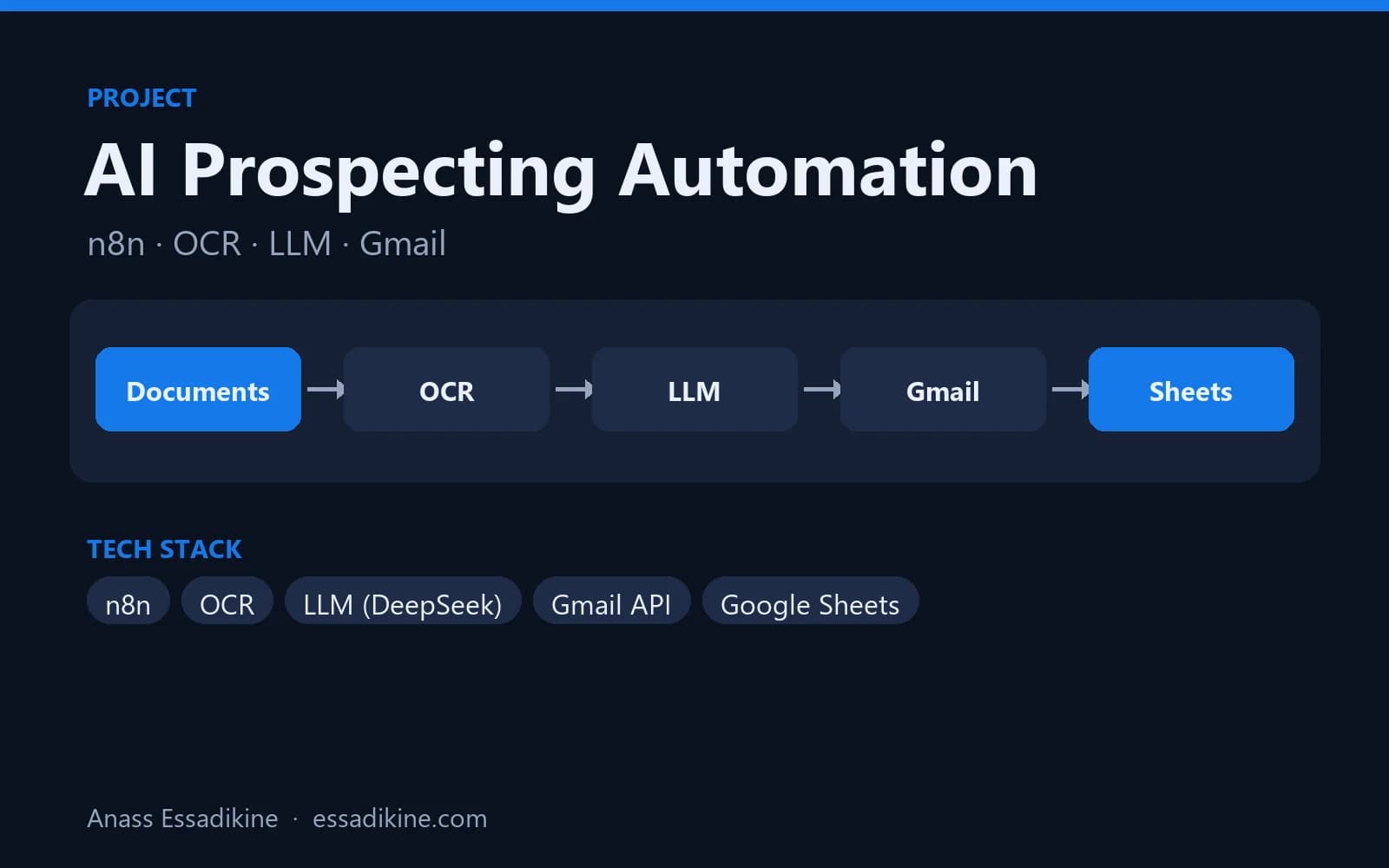
The AI prospecting automation built with n8n chains OCR, an LLM (DeepSeek), the Gmail API and Google Sheets, with versioned prompts and re-runnable steps. The step-by-step tutorial is in automating prospecting with n8n, an LLM and Gmail. If you want to understand when an LLM step becomes an agent, read what an AI agent is.
How steep is the learning curve?
Zapier
A linear "when this happens, do that" logic and a guided editor. A non-technical user can build a useful Zap in minutes.
Make
The visual canvas is intuitive, but concepts like iterators, aggregators, bundles and data mapping take a few days to master.
n8n
You work with JSON items, expressions and sometimes code. It is very comfortable for developers and data profiles, and demanding for beginners, especially when self-hosting.
Which tool should you choose for your case?
- Small team, no developer, standard SaaS apps: Zapier.
- Operations team, branching logic, many lists to process, tight budget: Make.
- Technical team, sensitive data, high volume, AI and RAG workflows: n8n, self-hosted or on n8n Cloud.
- Not sure: build the same small automation on two tools during their free tier or trial, and compare build time, readability and expected monthly consumption.
What mistakes should you avoid when choosing?
- Comparing list prices only: the billing unit (task, credit, execution) changes the real cost more than the headline price.
- Ignoring error handling: whatever the tool, plan what happens when an API fails, a field is empty or a quota is reached, and add alerts.
- Underestimating self-hosting: a self-hosted n8n needs updates, backups, HTTPS and monitoring; someone must own it.
- Hard-coding secrets: store API keys in the tool's credential manager, never in plain text inside a step.
- No documentation: name steps clearly and describe each workflow, otherwise nobody can maintain it six months later.
- Automating a broken process: fix and simplify the manual process first, then automate it.
Conclusion
There is no single best tool: Zapier wins on simplicity, Make on visual power per cost, and n8n on flexibility, self-hosting and AI depth. Compare them on your real workflow, count the billing units, and decide where your data should live. For automation and AI workflows built with n8n, see the AI automation and RAG service or the Data & AI Engineer profile.

Related projects
 AI & AutomationPersonal project · 2025
AI Prospecting Automation with n8n
An end-to-end workflow that reads documents with OCR, writes personalised emails with an LLM, sends them through Gmail and tracks everything in Google Sheets.
Frequently asked questions
The self-hosted Community Edition is free to use under n8n's fair-code licence; you only pay for the server and your maintenance time. n8n Cloud and the Business and Enterprise editions are paid, with a free trial for the cloud version.